




软件介绍
Adobe Photoshop Elements 2027(PS简化版)是一款面向摄影爱好者和家庭用户的AI图像处理工具,操作简单、上手轻松,支持自动抠图、智能调色、照片修复与批量编辑,内置多种引导式编辑及创意模板,让零基础用户也能快速修出好看的照片。
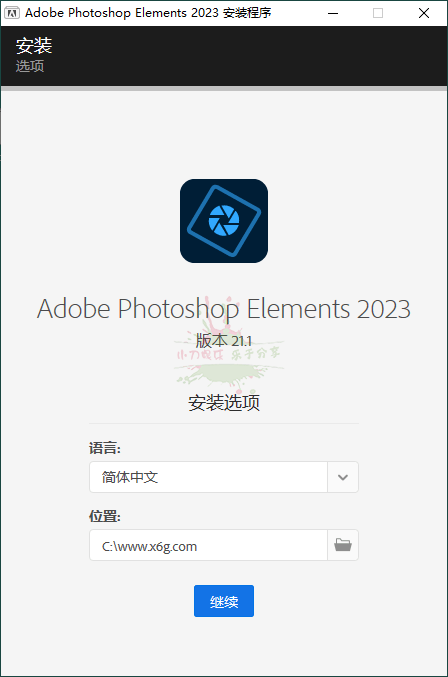
软件截图
更新日志
Photoshop Elements 2027 (27.0) 新增功能
https://helpx.adobe.com/photoshop-elements/using/whats-new.html
Adobe Photoshop 2027 v28.0 新版特性:
– 新增Relight布光工具,画布直调3个光源参数
– 生成式重调风格上线,AI效果转图层滑块可控
– 移除工具升级,自动连带阴影倒影一并清除
– 新增生成式重构图,改画幅AI自动调整画面
– 新增快速对比功能,分屏查看修图前后效果
– AI辅助编辑器优化,自然语言描述快速修图
– 生成式放大升级,分辨率和细节同步提升
– 支持自定义占位文本,替换默认排版假文
Adobe Photoshop Elements 版本于2019年10月正式上线,主打人工智能,让你一键P图!
PS简化版基于Adobe Sensei AI的智能强大功能,新增系列一键式照片效果和照片编辑工具。
特点描述
by vposy, m0nkrus
– 基于官方离线安装程序 v6.11.0.478.6 (未公开版) 重新打包
– 安装包重构优化,载荷数据重封装,完整保留原版全部功能
– 禁用后台遥测,已将日志与崩溃上报组件重命名为 .bak 占位
– 移除硬件校验逻辑,无 AVX2 指令集 CPU 设备也可正常安装
– 解除系统版本限制,Win10/Win11 低版本均可安装部署运行
– 修正安装界面语言选择菜单误标额外六种语言选项的显示异常
– 安装流程新增功能演示轮播部件,直观展示软件核心功能特性
– 安装流程新增自定义安装路径, 语言选择及安装完后自启动选项
– UXP WebView Support(UXP)首页屏幕支撑组件升级至最新版
– Adobe Content Synchronizer (Core Sync) 组件升级至最新版
– Adobe Camera Raw (Adobe增效工具滤镜) 版本升级至最新版
– Adobe CCX Process 组件版本升级至最新版,并禁用开机自启
– 剔除移除工具 AI 模型(Remove Tool ~5GB),保留基础功能
– 精简组件 Adobe Desktop Common (ADC) 仅留运行所需模块
– 完全移除 Adobe Creative Cloud创意云套件及其关联组件模块
– 自动移除 Adobe Genuine Service (AGS) 正版验证的后台服务
系统要求
· 操作系统:Windows 10 64位 及更高版(推荐 Windows 11)
· 运行库:.NET Framework 4.8 及更高版(Windows 11 通常自带)
· 内存:推荐 16GB;使用 AI生成式填充/AI修复/RWA处理 建议 32GB起步
· 显卡:2GB 显存可流畅运行基础功能;AI生成式功能建议 6GB+ 独立显卡
· Camera Raw:建议保持 Camera Raw 18.0+ 以支持最新相机 RAW 格式
(function () {
var script = document.currentScript;
var root = script && script.parentNode;
if (!root) return;
// UEditor preserves div/h6 and class attributes; normalize only marked blocks.
Array.prototype.forEach.call(root.querySelectorAll(‘div.x6d-accordion’), function (source) {
var heading = source.firstElementChild;
if (!heading || heading.tagName !== ‘H6’) return;
var details = document.createElement(‘details’);
details.className = source.className;
var summary = document.createElement(‘summary’);
while (heading.firstChild) summary.appendChild(heading.firstChild);
source.removeChild(heading);
details.appendChild(summary);
while (source.firstChild) details.appendChild(source.firstChild);
source.parentNode.replaceChild(details, source);
});
var items = root.querySelectorAll(‘details.x6d-accordion’);
Array.prototype.forEach.call(items, function (item) {
var title = item.querySelector(‘summary’);
var panel = title && title.nextElementSibling;
if (!title || !panel || !panel.classList.contains(‘x6d-accordion-panel’)) return;
var expanded = false;
var timer;
item.removeAttribute(‘open’);
item.removeAttribute(‘name’);
title.setAttribute(‘aria-expanded’, ‘false’);
var icon = document.createElement(‘i’);
icon.className = ‘fa fa-chevron-down’;
icon.setAttribute(‘aria-hidden’, ‘true’);
title.appendChild(icon);
function finishTransition() {
clearTimeout(timer);
if (expanded) {
panel.style.maxHeight = ‘none’;
} else {
panel.style.maxHeight = ‘0px’;
item.open = false;
}
}
panel.addEventListener(‘transitionend’, function (event) {
if (event.target === panel && event.propertyName === ‘max-height’) finishTransition();
});
title.addEventListener(‘click’, function (event) {
event.preventDefault();
clearTimeout(timer);
// Freeze the rendered height before reversing or starting a transition.
// Disabling transitions for this measurement avoids a stale start frame.
var height = item.open ? panel.getBoundingClientRect().height : 0;
expanded = !expanded;
title.setAttribute(‘aria-expanded’, String(expanded));
icon.className = ‘fa ‘ + (expanded ? ‘fa-chevron-up’ : ‘fa-chevron-down’);
panel.style.transition = ‘none’;
panel.style.maxHeight = height + ‘px’;
item.open = true;
void panel.offsetHeight;
panel.style.transition = ”;
panel.style.maxHeight = expanded ? panel.scrollHeight + ‘px’ : ‘0px’;
// Normal completion uses transitionend, not a timer racing the last frame.
// The fallback handles background tabs and a zero-distance transition.
timer = setTimeout(finishTransition, 400);
});
});
}());








WAng 2年前1
感谢分享KASUMI12 2年前1
感谢楼主分享joe2年前1
使用怎么下载?夜空中闪耀的星2年前1
感谢楼主分享froverkkk 2年前1
66666666几米 2年前1
怎么下载啊Helloyoyo 2年前1
感谢分享xiaobohk 2年前1
感谢分享