



软件介绍
edge浏览器便携增强补丁是一款适用Microsoft Edge浏览器最新版的DLL转发注入补丁,可将用户数据与缓存重定向至本地目录实现便携化运行,并增强标签页操作、自定义老板键与翻译键、关闭AI按钮及侧边栏、移除更新错误提示。
软件截图
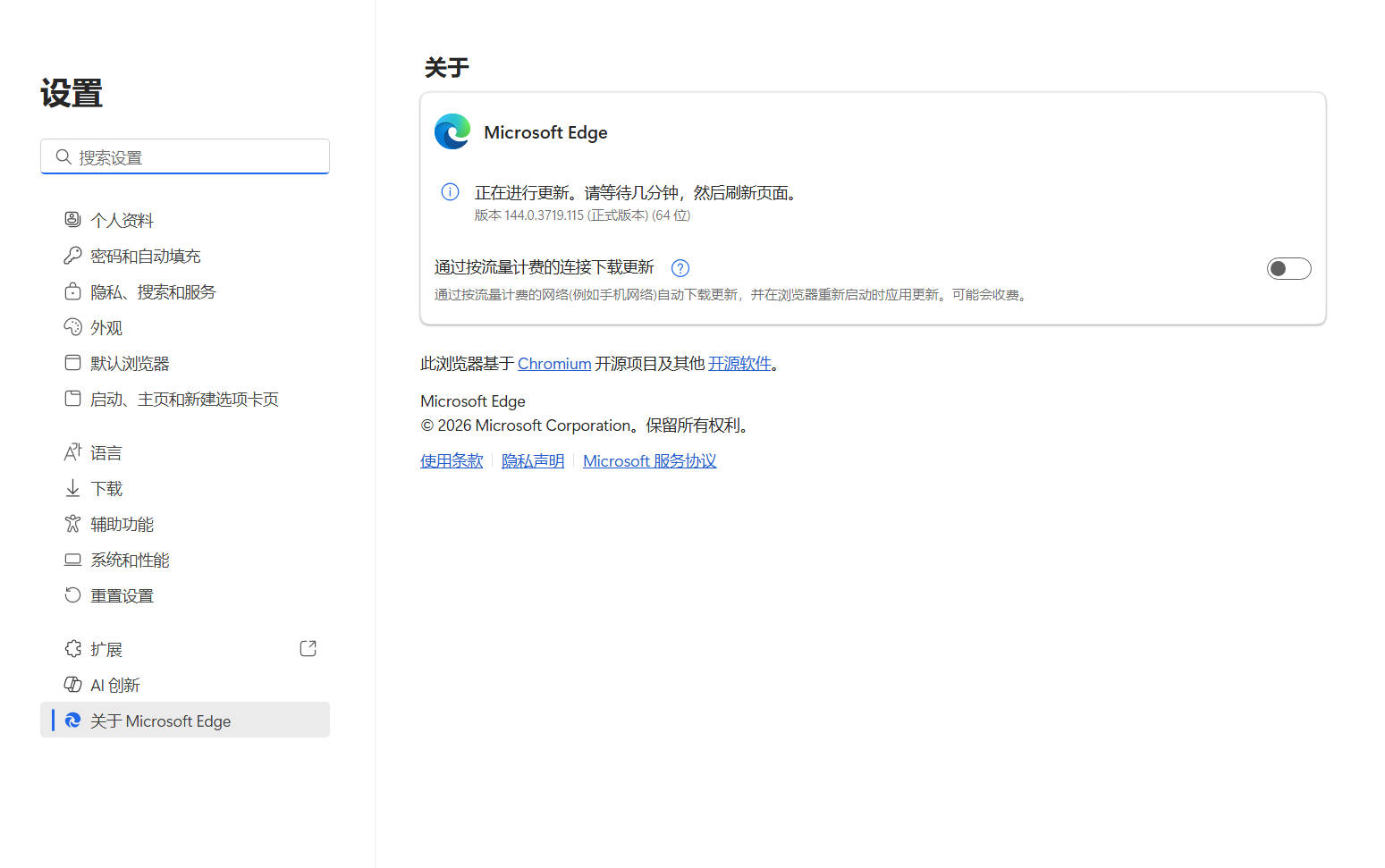
新版变化
2026.11.06 v1.15.0
– 兼容157最新版
2026.10. 16 v1.12.0
– IE模式不再弹“关闭远程调试”提示
– 隐藏更新错误后的残留空白一并铲平
特点描述
特性:数据/缓存便携化・老板键・翻译键・标签增强・开关AI功能!
└─数据与缓存目录独立存放,不残留注册表项,配置「msedge.ini」
└─支持双击标签页关闭、鼠标滚轮切换标签、按右键滚轮切换标签页
└─支持自定义老板键一键隐藏、自定义网页翻译快捷键
└─隐藏工具栏聊天与反馈按钮,关闭 Copilot 及侧边栏
└─屏蔽旧版升级提醒、屏蔽关于页面版本更新错误提示
# 如何使用?
1. 原版所在位置目录 msedge_elf.dll -> 重命名 -> msedge_elf_orig.dll
2. 便携增强补丁 msedge_elf.dll 替换到原版edge程序所在位置目录覆盖
# 由于是便携版不会和其它版数据冲突,不想用了直接删除掉整个文件夹
# 机制原理 msedge_elf.dll 注入转发到Edge浏览器 msedge.exe 实现的
※ 提醒:如果启动提示应用程序错误,请取消防护软件[保护所有浏览器]!
(function () {
var script = document.currentScript;
var root = script && script.parentNode;
if (!root) return;
// UEditor preserves div/h6 and class attributes; normalize only marked blocks.
Array.prototype.forEach.call(root.querySelectorAll(‘div.x6d-accordion’), function (source) {
var heading = source.firstElementChild;
if (!heading || heading.tagName !== ‘H6’) return;
var details = document.createElement(‘details’);
details.className = source.className;
var summary = document.createElement(‘summary’);
while (heading.firstChild) summary.appendChild(heading.firstChild);
source.removeChild(heading);
details.appendChild(summary);
while (source.firstChild) details.appendChild(source.firstChild);
source.parentNode.replaceChild(details, source);
});
var items = root.querySelectorAll(‘details.x6d-accordion’);
Array.prototype.forEach.call(items, function (item) {
var title = item.querySelector(‘summary’);
var panel = title && title.nextElementSibling;
if (!title || !panel || !panel.classList.contains(‘x6d-accordion-panel’)) return;
var expanded = false;
var timer;
item.removeAttribute(‘open’);
item.removeAttribute(‘name’);
title.setAttribute(‘aria-expanded’, ‘false’);
var icon = document.createElement(‘i’);
icon.className = ‘fa fa-chevron-down’;
icon.setAttribute(‘aria-hidden’, ‘true’);
title.appendChild(icon);
function finishTransition() {
clearTimeout(timer);
if (expanded) {
panel.style.maxHeight = ‘none’;
} else {
panel.style.maxHeight = ‘0px’;
item.open = false;
}
}
panel.addEventListener(‘transitionend’, function (event) {
if (event.target === panel && event.propertyName === ‘max-height’) finishTransition();
});
title.addEventListener(‘click’, function (event) {
event.preventDefault();
clearTimeout(timer);
// Freeze the rendered height before reversing or starting a transition.
// Disabling transitions for this measurement avoids a stale start frame.
var height = item.open ? panel.getBoundingClientRect().height : 0;
expanded = !expanded;
title.setAttribute(‘aria-expanded’, String(expanded));
icon.className = ‘fa ‘ + (expanded ? ‘fa-chevron-up’ : ‘fa-chevron-down’);
panel.style.transition = ‘none’;
panel.style.maxHeight = height + ‘px’;
item.open = true;
void panel.offsetHeight;
panel.style.transition = ”;
panel.style.maxHeight = expanded ? panel.scrollHeight + ‘px’ : ‘0px’;
// Normal completion uses transitionend, not a timer racing the last frame.
// The fallback handles background tabs and a zero-distance transition.
timer = setTimeout(finishTransition, 400);
});
});
}());









WAng 2年前1
感谢分享KASUMI12 2年前1
感谢楼主分享joe2年前1
使用怎么下载?夜空中闪耀的星2年前1
感谢楼主分享froverkkk 2年前1
66666666几米 2年前1
怎么下载啊Helloyoyo 2年前1
感谢分享xiaobohk 2年前1
感谢分享